Subtitle delay is one of the easiest subtitle problems to notice and one of the easiest to fix when the delay is consistent. The video plays, a character speaks, and the caption appears a moment later. In many cases the subtitle text is not wrong at all. The timestamps are simply shifted later than the audio.
A delay can happen when a subtitle file was made for a different release of the same movie, a different frame rate, a streaming version with a logo at the beginning, or a cut that includes a recap. The useful question is not only "how late are the subtitles?" but also "are they late by the same amount from start to finish?" This guide shows how to answer that question, calculate a clean offset, and use the Subtitle Shifter to repair the file without rewriting every cue by hand.
Confirm that the problem is really subtitle delay
Start by watching a scene with clear speech and a visible reaction, such as a door slam, a name being called, or a line that ends before the camera cuts. If the subtitle appears after the spoken line, pause the video and estimate the gap. A small delay may be 300 to 700 milliseconds. A delay that feels obvious is often between one and three seconds.
Check at least three places in the video: near the beginning, around the middle, and close to the end. If the subtitle is always late by almost the same amount, you have a simple offset. If the subtitle starts close but gets worse later, skip to a broader sync guide such as Subtitles Out of Sync, because a single delay adjustment may not solve drift.
Step-by-step: fix delayed subtitles online
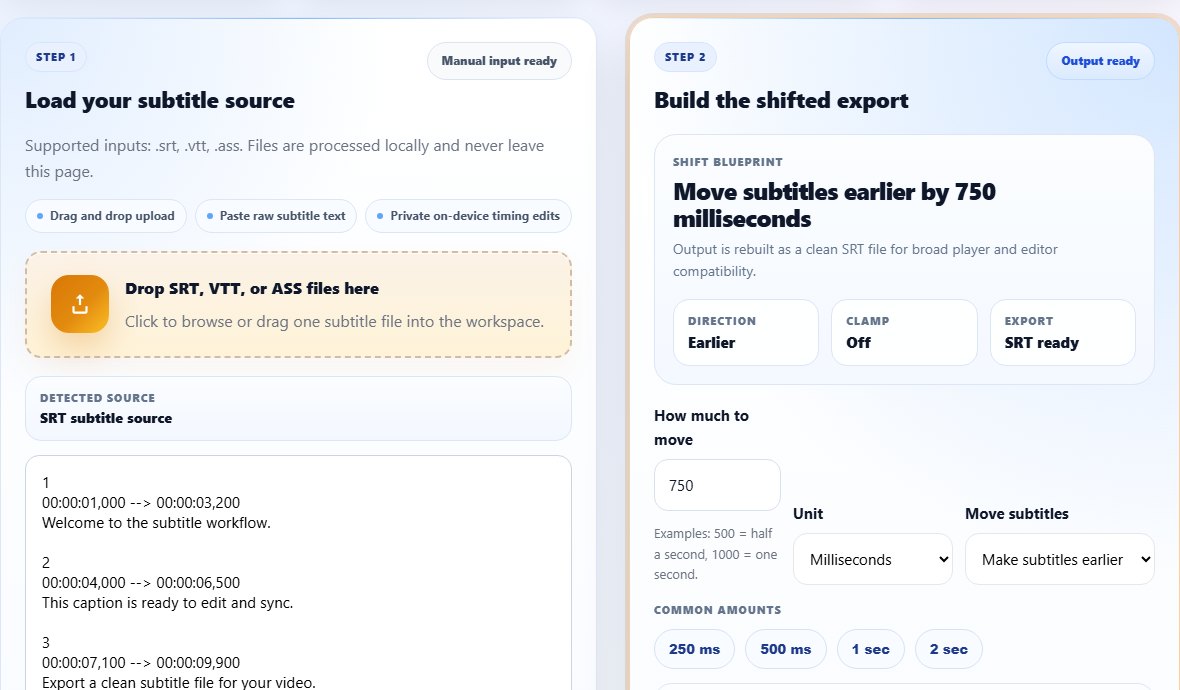
For delayed subtitles, the direction matters. You are not adding more delay; you are moving captions earlier. If the tool uses plus and minus language, a late subtitle usually needs a negative shift. The TranslateSubtitles.net interface labels the action in plain language so you can choose "Make subtitles earlier" instead of guessing from symbols.
- Open the Subtitle Shifter in your browser.
- Upload the SRT, VTT, or ASS subtitle file, or paste the subtitle text into the input box.
- Enter the amount of delay you want to remove. If captions are two seconds late, enter 2 seconds or 2000 milliseconds.
- Choose the direction that makes subtitles earlier. This moves every cue closer to the dialogue.
- Enable clamping if the first subtitle would move before 00:00:00,000.
- Run the shift, preview the result, then download the corrected SRT file.
- Test the new file in the same video player before replacing the original.
Tips for choosing the right offset
Use milliseconds when the sync is almost correct. A 250 ms adjustment can make subtitles feel more natural without creating a visible jump. Use seconds when the delay is obvious. If the captions appear after every line by about two beats, try 1.5 or 2 seconds first, then fine tune in smaller steps.
Do not judge the timing from only the first caption. Opening credits, music, and scene changes can make the first cue misleading. Dialogue-heavy scenes are better for testing because the relationship between voice and subtitle is clear. If possible, test against a line with a hard consonant or a short response because those make timing errors easier to see.
Best scene for testing delay
Choose a short exchange where a speaker starts and stops clearly. Fast action scenes, songs, and overlapping dialogue make delay harder to measure.
Common mistakes when fixing subtitle delay
- Adding delay when the subtitles are already late. The fix is to move subtitles earlier.
- Using a huge offset based on the first cue without checking the middle and end of the video.
- Editing timestamps manually in a text editor and accidentally breaking the SRT timestamp format.
- Forgetting to save a backup of the original subtitle file before testing a new version.
- Assuming a timing fix will repair bad line breaks, encoding problems, or missing cues.
Related tools
Use these tools when you are ready to apply the workflow from this guide.
Related guides
FAQ
Why are my subtitles delayed?
Most delayed subtitles were made for a slightly different video version. Even a studio logo, recap, or skipped intro can push every cue later than the audio.
Should I shift subtitles earlier or later?
If captions appear after the dialogue, shift them earlier. If captions appear before the dialogue, shift them later.
Can I fix subtitle delay on my phone?
Yes. The Subtitle Shifter runs in the browser, so you can upload or paste a file from a phone and export a corrected SRT.
Will shifting subtitles change the text?
No. A timing shift changes cue start and end times. It does not rewrite the caption text.